Voice Guidance Does Not Function
NAVIGATION: NAVIGATION SYSTEM: Voice Guidance does not Function
- Voice Guidance does not Function
INSPECTION PROCEDURE
PROCEDURE
1. CHECK NAVIGATION SETTING
(a) Display the "Voice Settings" screen.
(b) Check that "Off" is not selected.
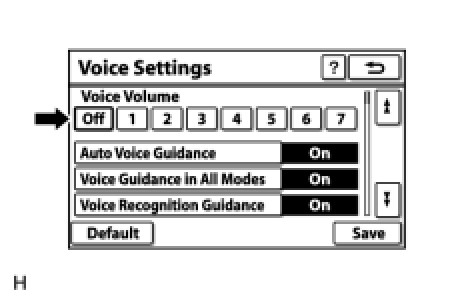
OK:
"Off" is not selected.
NG -- SELECT VOICE VOLUME SETTING OTHER THAN "Off"
OK -- Continue to next step.
2. CHECK NAVIGATION SETTING
(a) Display the "Voice Settings" screen.
(b) Check that "Auto Voice Guidance" is not "Off".
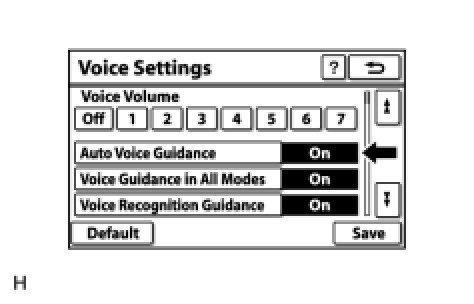
OK:
"Auto Voice Guidance" is not "Off".
NG -- TURN AUTO VOICE GUIDANCE "On"
OK -- Continue to next step.
3. CHECK NAVIGATION SETTING
(a) Display the "Voice Settings" screen.
(b) Check that "Voice Guidance in All Modes" is not "Off".
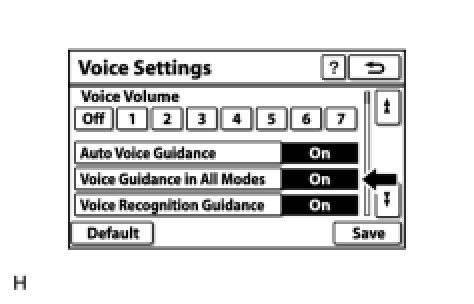
OK:
Voice Guidance in All Modes" is not "Off".
NG -- REPLACE NAVIGATION RECEIVER ASSEMBLY Removal
OK -- Continue to next step.
4. CHECK MAP DISC
(a) Check that the map disc is not deformed or cracked.
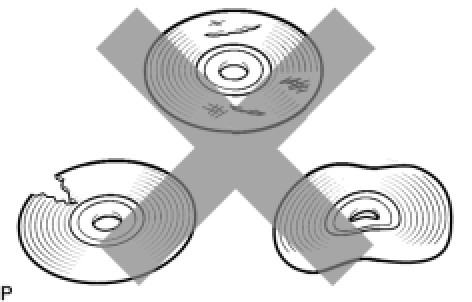
OK:
No deformations or cracks on the map disc
NG -- REPLACE MAP DISC
OK -- Continue to next step.
5. CHECK AUDIO FUNCTION
(a) Check that audio can be heard from the driver side speaker.
OK:
Audio can be heard.
NG -- PROCEED TO NEXT SUSPECTED AREA SHOWN IN PROBLEM SYMPTOMS TABLE Symptom Related Diagnostic Procedures
OK -- REPLACE NAVIGATION RECEIVER ASSEMBLY Operation Check