Screen Flicker or Color Distortion
NAVIGATION: NAVIGATION SYSTEM: Screen Flicker or Color Distortion
- Screen Flicker or Color Distortion
INSPECTION PROCEDURE
PROCEDURE
1. CHECK DISPLAY SETTING
(a) Enter the display adjustment screen by pressing the "DISP" switch.
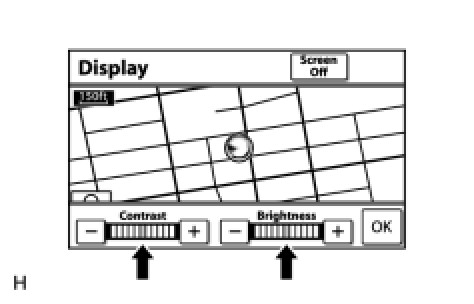
(b) Reset display settings (contrast, brightness) and check that the screen appears normal.
OK:
The display returns to normal.
NG -- CHECK CABIN
OK -- END
2. CHECK CABIN
(a) Check that the cabin temperature is higher than -20°C (-4°F).
OK:
The cabin temperature is higher than -20°C (-4°F).
NG -- HEAT CABIN AND RECHECK TEMPERATURE
OK -- Continue to next step.
3. CHECK COLOR BAR (OPERATION CHECK)
(a) Enter the "Color Bar Check Mode" screen (Check Color Bar) Operation Check.
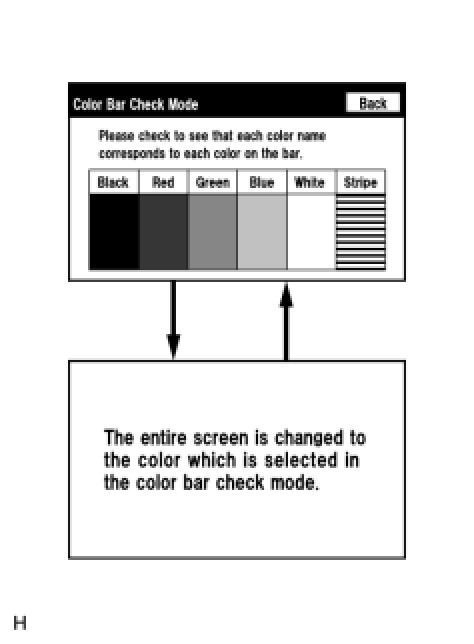
(b) Check that the color bars match the displayed names.
OK:
Color bars match the displayed names.
NG -- REPLACE NAVIGATION RECEIVER ASSEMBLY Removal
OK -- PROCEED TO NEXT SUSPECTED AREA SHOWN IN PROBLEM SYMPTOMS TABLE Symptom Related Diagnostic Procedures